Recruiting is not just about finding candidates—it’s about knowing where the best candidates come from. Companies spend significant budgets on job boards, LinkedIn campaigns, referral programs, and social media ads. But without proper source tracking, it’s nearly impossible to tell which channels deliver real results. That’s where Rippling’s applicant source tracking code feature comes in.
 In this article, I’ll explain how Rippling supports applicant source tracking codes, share some hands-on methods for using them, and provide practical examples including sample code snippets. I’ll also add my own perspective on why this matters for recruiters and HR leaders.

In this article, I’ll explain how Rippling supports applicant source tracking codes, share some hands-on methods for using them, and provide practical examples including sample code snippets. I’ll also add my own perspective on why this matters for recruiters and HR leaders.
Why Applicant Source Tracking Codes Matter
From my experience working with HR teams, I’ve seen many companies blindly throw money into recruitment campaigns. They know they’re getting applicants, but they don’t know if LinkedIn ads are working better than Indeed, or if referrals outperform both. Applicant source tracking codes solve this problem by giving recruiters visibility into the candidate journey. Benefits include:- Data-driven recruiting decisions: Know which channels produce quality hires.
- Better budget allocation: Cut spending on low-performing sources.
- Improved candidate experience: Focus on channels where applicants are more engaged.
- Reporting clarity: Tie hires back to campaigns with hard data.
How Rippling Supports Applicant Source Tracking
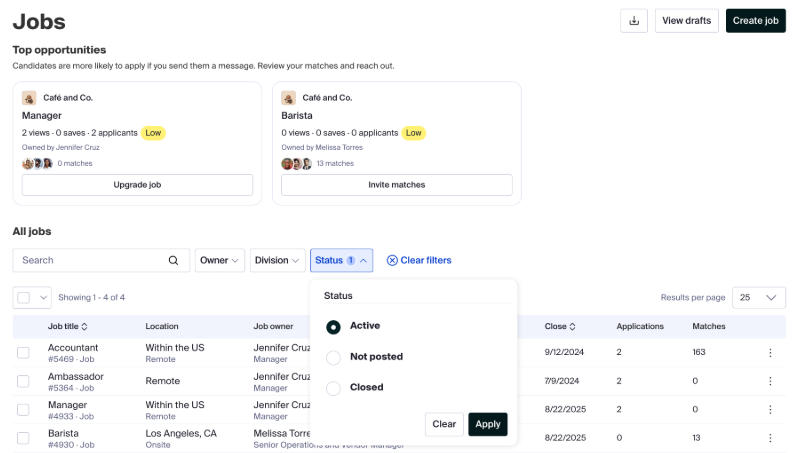
Rippling’s Applicant Tracking System (ATS) lets you append tracking codes to your job postings or career site links. When candidates apply through these links, Rippling automatically records the source in its recruiting dashboard.Key Features
- Custom Source Codes: Create unique codes for LinkedIn, Indeed, referrals, or even niche job boards.
- UTM Parameter Support: Append UTM tags to track campaigns just like in Google Analytics.
- Automatic Attribution: When a candidate applies, their profile is tagged with the correct source.
- Reporting & Analytics: Generate source-based hiring funnel reports.
Practical Implementation: Step-by-Step
Here’s a method I recommend for setting up and using source tracking in Rippling: 1. Define Your Sources: Make a list of channels (LinkedIn, Indeed, Employee Referrals, etc.). 2. Generate Tracking Codes: In Rippling, assign a tracking code for each source. 3. Add Codes to Job Links: When posting jobs, append the tracking code (or UTM parameter) to your URLs. 4. Test the Links: Click each link, apply with a test account, and confirm Rippling records the correct source. 5. Monitor Reports: Use Rippling dashboards to see which sources are driving the best candidates. Example 1: Rippling Source Tracking Code Here’s a simplified example of how a job posting URL might look with a Rippling source tracking code: html <a href="https://careers.yourcompany.com/jobs/software-engineer?source=linkedin"> Apply on LinkedIn </a> When candidates click this link and apply, Rippling tags their application as coming from LinkedIn. Example 2: Applicant Source Tracking Code for LinkedIn Campaign If you’re running a paid campaign on LinkedIn, you can use UTM parameters along with Rippling’s source tracking: html <a href="https://careers.yourcompany.com/jobs/software-engineer?utm_source=linkedin&utm_medium=cpc&utm_campaign=fall_hiring"> Apply Now </a>- utm_source=linkedin tells Rippling (and analytics tools) that the source is LinkedIn.
- utm_medium=cpc indicates this is a paid ad.
- utm_campaign=fall_hiring helps track which campaign drove the traffic.
My Perspective: Lessons Learned
Over the years, I’ve noticed three common mistakes companies make when implementing source tracking codes: 1. Not Testing Links: Recruiters assume the codes work, but they never test them. Always run a test application. 2. Using Generic Sources: If every applicant is tagged “LinkedIn,” you miss the nuance between paid campaigns vs. organic posts. Always go granular. 3. Ignoring Post-Hire Data: It’s not enough to track where applicants come from—you need to follow the funnel. Did LinkedIn applicants actually get hired and perform well? Rippling can help you see this. Personally, I’ve seen companies save tens of thousands of dollars annually by shifting spend away from underperforming boards once they had clear tracking data.Best Practices for Using Tracking Codes in Rippling
- Be Consistent: Always use the same format for UTM tags.
- Integrate with Analytics: Sync with Google Analytics for deeper campaign insights.
- Document Your Sources: Keep a shared spreadsheet of source codes to avoid duplication.
- Review Monthly: Use Rippling’s reports to review and adjust sourcing strategy every month.
Final Thoughts
Rippling’s support for applicant source tracking codes is more than a technical feature—it’s a strategic tool. It empowers recruiters to move from gut feeling to data-driven decision-making. When used properly, these codes help you cut waste, double down on what works, and ultimately build stronger teams. My recommendation: don’t just turn on source tracking and forget it. Treat it like a marketing campaign—analyze, iterate, and refine. With Rippling and a thoughtful tracking strategy, you’ll know exactly which channels fuel your company’s growth.Need the right payroll tool?
Use the recommendation quiz to choose between Deel, Remote, Oyster, Rippling and Gusto based on hiring countries, worker type and accounting workflow.
Related tags: code