Global Payroll · EOR · Contractor Payments

Find the right payroll platform for your remote team.

Remotexa helps startup founders, HR teams and finance leaders choose between Deel, Remote, Oyster, Rippling, Gusto and other payroll platforms based on how they actually hire, pay and manage people across countries.

ContractorInvoices, tax forms, payouts
EORHire without local entities
PayrollUS, global and finance sync
Software fit calculator

Get a payroll shortlist

Answer five quick questions. The result recommends the best starting point for your team: Deel, Remote, Oyster, Rippling, Gusto or Pilot.

What Remotexa is built for

Choose payroll software by hiring scenario, not by a generic top-10 list.

Global payroll, EOR and contractor management tools often advertise similar features. The real buying decision depends on worker type, hiring country, payroll complexity, accounting software, compliance support and the internal team that will own the workflow.

01

Contractor payment workflows

Use this path when your team pays freelancers, agencies or consultants across borders. The right platform should handle contracts, invoices, payment methods, tax forms, vendor records and approval steps without forcing your finance team into manual reconciliation every month.

02

EOR and international employment

Use this path when you need a full-time employee in a country where your company does not have a local entity. Compare country coverage, onboarding timeline, benefits administration, payroll funding, termination support and the level of local compliance guidance available.

03

Payroll plus finance integration

Use this path when payroll data must connect with QuickBooks, Xero, NetSuite or another accounting system. The best tool is not just the one with an integration logo; it is the one that syncs vendors, bills, payments, documents and approval workflows cleanly.


Buying workflow

A better SaaS affiliate page should guide the visitor to a decision.

For global payroll, the user usually arrives with a problem: hiring abroad, paying contractors, comparing EOR vendors, or connecting payroll with accounting. A calculator-led homepage is feasible and recommended because it turns broad traffic into segmented intent.

The page should not only say “best payroll software.” It should ask what the visitor is trying to do, recommend a category, then route them to a high-intent review, comparison or integration guide. This improves user experience and makes affiliate CTAs feel like the next logical step instead of a random button.

Step 1Identify worker type: contractors, employees or both.
Step 2Check country footprint and whether EOR is required.
Step 3Match payroll data to finance and HR workflows.
Step 4Send the user to the best vendor review or comparison page.
Decision table

Fast shortlist by buyer intent

Use this table when you already know the business situation but need a practical starting point before comparing product details.

Buyer scenarioStart withWhyNext page
Hiring contractors in multiple countriesDeelStrong contractor, global payroll and accounting integration fit.Deel review
Hiring full-time employees without local entitiesRemote or DeelEOR support, country coverage and onboarding process are the core buying triggers.Deel vs Remote
US-only payroll and HR basicsGustoSimpler than a global EOR platform when international employment is not required.Deel vs Gusto
HR + IT + payroll operating systemRipplingBetter when apps, devices, onboarding and employee lifecycle workflows matter.Deel vs Rippling
Free tool

Global Payroll Software Recommendation Quiz

Answer five questions, submit a valid work email and get a practical shortlist for Deel, Remote, Oyster, Rippling or Gusto. The recommendation is shown only after the email is accepted.

High-intent page

Already comparing Deel with QuickBooks?

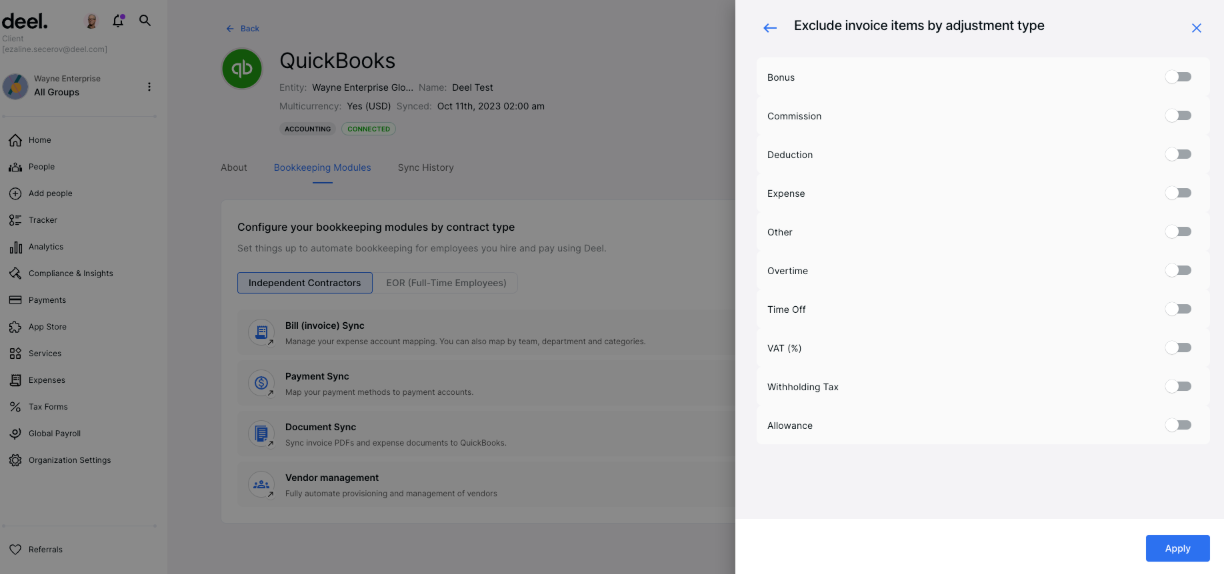
Finance teams need more than a generic review. This guide explains setup requirements, sync options, limitations, vendor mapping, bill workflows and what to verify before relying on an accounting integration.

Popular buying guides

Deep-dive guides for Deel, EOR pricing and accounting sync

Use these practical guides when your team is already checking total cost, vendor fit, payroll operations or finance integration details.

Deel EOR Pricing Explained: Is It Worth the Cost? tutorials

Deel EOR Pricing Explained: Is It Worth the Cost?

In the world of global hiring, EOR (Employer of Record) services are no longer a niche solution. For startups testing international markets, or mid-sized companies…

Updated: Sep 22, 2025

FAQ

Common questions before choosing global payroll software

These answers are written for buyers who are deciding whether they need a payroll tool, an EOR provider, a contractor payment system or a broader HR platform.

Remotexa helps founders, HR leaders and finance teams shortlist global payroll, Employer of Record, contractor payment and US payroll software. Instead of ranking tools by generic star ratings, we map each recommendation to a real buying situation: hiring contractors, employing people through EOR, running US payroll, syncing with accounting software, or building a broader HR and IT operating system.
Start with the worker type and country footprint. Deel is often a strong first shortlist when contractors, EOR and finance integrations overlap. Remote and Oyster are useful EOR alternatives for global employment. Rippling fits companies that want HR, IT and payroll in one system. Gusto is usually simpler for US-first small businesses that do not need international employment workflows.
Global payroll decisions depend on context. A 12-person startup paying contractors in five countries has a different buying path than a US-only company running domestic payroll, or a 200-person company that needs HR, IT, app access and payroll automation. The calculator turns that context into a shortlist, which is more useful than a static best-software list.
No. Remotexa is a software comparison and affiliate recommendation site, not a law firm, accounting firm or payroll provider. Use our guides to understand product fit, questions to ask vendors and workflows to verify. Before hiring in a new country or switching payroll systems, confirm local employment, tax, benefits and compliance requirements with qualified professionals or the vendor team.
Use the calculator to identify the likely tool category, then read the review or comparison page for your strongest options. Before booking a demo, prepare your hiring countries, worker types, payroll volume, accounting software, approval workflow, required currencies and onboarding deadline. This makes sales calls shorter and helps you compare vendors on the same requirements.
Methodology

How Remotexa evaluates global payroll software

Use-case fit

We start with the buyer scenario: contractors, EOR, owned-entity payroll, US payroll, HRIS, accounting integration or workforce automation.

Operational friction

We look for setup requirements, approval flows, vendor mapping, country availability, finance handoff and reporting needs.

Monetization clarity

Affiliate links never override product fit. Pages are written to help readers pick the right shortlist before booking a demo.